
RTK: Cut Your Token Consumption by 80% Without Changing Your Workflow
Thirty minutes into a Claude Code session. A git diff on a busy branch, a few test runs, a couple of directory listings. And just when the agent starts losing track of what it was doing, you glance at the context window: 60% used. By command output.
This isn’t a model problem. It’s a volume problem. CLI tools return data designed for a human skimming line by line; an LLM tokenizes everything. ANSI formatting, blank lines, repeated warnings, useless metadata: every character counts.
RTK (Rust Token Killer) sits between the shell and the LLM context to filter that noise before it gets in. No magic; deterministic compression applied to 100+ common commands. The source code is available on GitHub.
TL;DR — RTK reduces tokens consumed by CLI output by 60–90% in an agentic AI workflow. One-command install, automatic activation via hook for Claude Code. Gains are real on Linux/macOS and WSL; Windows native has no hook, savings come through an explicit CLAUDE.md.
Why Do Tokens Disappear So Fast in an Agentic Session?
In my experience, a failing cargo test commonly outputs between 400 and 600 lines. Half of them are full paths to source files, line numbers, and stack traces repeated for each failed assertion. The agent needs to know what failed and where; it doesn’t need the 200 surrounding lines of context.
Same story with git diff: between patch metadata, unchanged context lines, and encoding warnings, the useful part rarely exceeds 30% of the raw output — a conservative estimate based on my own sessions. Multiplied across a dozen calls per session, that’s a significant fraction of the context window gone without adding any value.
In my Claude Code sessions, command output consistently accounts for 40 to 60% of tokens consumed, yet carries only 20 to 30% of the useful information. It’s noise we accept by default because nobody measures it — and no tool measures it on our behalf.
Output compression isn’t a new concept. It’s simply absent from agentic AI workflows by default, because those workflows were designed around capabilities (the agent can read files, run commands) rather than context efficiency.
According to the official RTK README (May 2026 edition), a 30-minute Claude Code session consumes roughly 118,000 tokens without RTK; with RTK, the same workflow drops to 23,900 tokens — an 80% reduction.
To understand how Claude Code agents manage their context window, the dedicated article covers what this architecture concretely changes for engineering teams.
How Does RTK Filter Tokens Without Losing What Matters?
RTK reduces tokens per command output by an average of 80% by applying four complementary strategies, selected based on the command type.
Smart filtering: comments, blank lines, ANSI formatting, and metadata irrelevant to an LLM are stripped before transmission. For cargo clippy, that’s up to 80% of the raw output’s characters (RTK README, retrieved 2026-05-16).
Grouping: similar items are aggregated. Instead of 15 distinct not found lines, RTK returns 15 items: not found. Applied to TypeScript build errors or grep results, the gain is immediate.
Contextual truncation: only relevant context is kept. For diffs, RTK retains only modified blocks with a reduced context window. For tests, only failing cases are returned.
Deduplication: identical lines are counted and replaced by a single entry with a counter. On verbose Docker logs or repetitive linter warnings, this is the most effective strategy.
Each optimization is command-specific: RTK processes git diff differently from docker logs, which is itself handled differently from pytest. That’s what sets it apart from a plain head -n 100: the savings are targeted, not blunt.
RTK (Rust Token Killer) is a Rust CLI proxy that compresses shell command output before it reaches the LLM context. By applying command-specific filtering, grouping, truncation, and deduplication, it reduces tokens consumed on a 30-minute development session by an average of 80%, with less than 10ms of overhead (RTK README, retrieved 2026-05-16).
Installing and Activating RTK in 3 Commands
Installation depends on the platform, but in every case it’s a single Rust binary with no external dependencies.
On macOS and Linux:
# Via Homebrew (recommended)
brew install rtk

# Via curl
curl -fsSL https://raw.githubusercontent.com/rtk-ai/rtk/refs/heads/master/install.sh | sh
Verify the install:
rtk --version
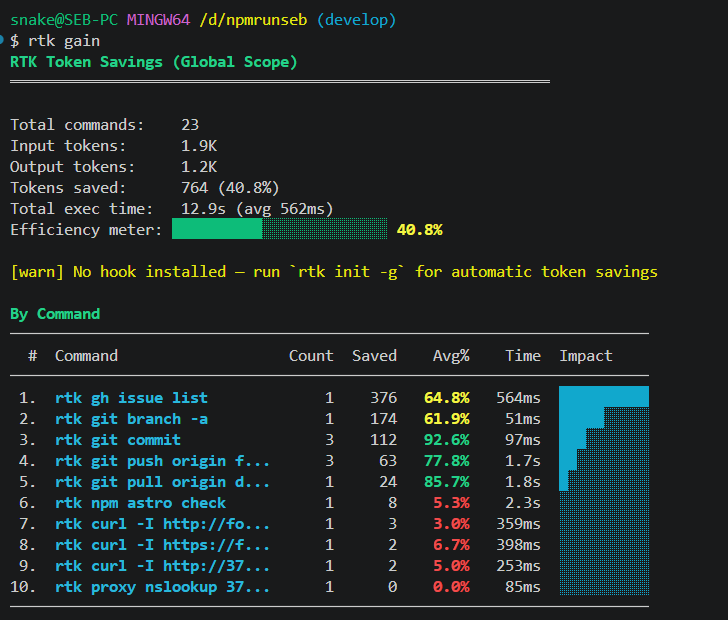
rtk gain  # shows accumulated savings statistics
Activate for Claude Code:
rtk init -gThis command installs a PreToolUse hook in the global Claude Code configuration. From that point on, all Bash commands pass through RTK before their output reaches the agent’s context; zero workflow change required.
RTK natively supports 13 integrations: Claude Code, Cursor, Gemini CLI, Windsurf, Cline/Roo Code, Kilo Code, and several others. Each agent has its own init command:
rtk init -g --copilot    # GitHub Copilot
rtk init --agent cursor  # Cursor
rtk init --agent cline   # Cline/Roo Code
rtk init --agent gemini  # Gemini CLI
On Windows native: the PreToolUse hook isn’t supported outside of WSL. The alternative is to add RTK instructions explicitly in the project’s CLAUDE.md (rtk init generates a ready-to-use block). Commands must be prefixed manually with rtk; there’s no auto-rewrite.
How Many Tokens Do You Actually Save in a Typical Session?
Here are the figures documented in the RTK README for a 30-minute Claude Code session, based on typical usage of each command:
| Command | Frequency | Standard tokens | RTK tokens | Savings |
|---|---|---|---|---|
ls/tree | 10× | 2,000 | 400 | −80% |
cat/read | 20× | 40,000 | 12,000 | −70% |
grep/rg | 8× | 16,000 | 3,200 | −80% |
git status | 10× | 3,000 | 600 | −80% |
git diff | 5× | 10,000 | 2,500 | −75% |
cargo test | 5× | 25,000 | 2,500 | −90% |
pytest | 4× | 8,000 | 800 | −90% |
| Total | — | 118,000 | 23,900 | −80% |
Source: RTK README, “ROI Analysis” section, retrieved 2026-05-16.
The biggest single line item in my daily usage is cat/read: 20 file reads in a 30-minute session is a conservative estimate for active codebase work. At 40,000 standard tokens versus 12,000 with RTK, that’s where most of the real savings happen.
On pay-per-token workflows (Aider, Gemini CLI), regular users report savings of $200–$500+ per month on API bills (RTK README, retrieved 2026-05-16). On Claude Code with fixed credits, the payoff is measured differently: complex tasks that used to hit context limits now complete in a single session.
Overhead is under 10ms per command; imperceptible in practice.
What RTK Doesn’t Cover
RTK operates only on shell command output. What enters the context through other channels — files read directly by the agent, MCP tool results, user messages — isn’t filtered.
In a standard Claude Code workflow, this is a concrete limitation: the native Read, Grep, and Glob tools bypass RTK. To maximize savings, you can either favor the equivalent Bash commands (rtk grep, rtk ls), or accept that built-in tools remain uncompressed. In my sessions, I estimate RTK intercepts roughly two thirds of calls; the remaining third goes through native tools.
Other points to keep in mind:
- Windows native: no auto-rewrite; savings require explicit CLAUDE.md instructions and the
rtkprefix on every command. - Compression without understanding: on custom or unusual command output, the filter may strip lines a developer would have found useful.
- Interactive commands: RTK falls back to passthrough mode; the hook can’t compress what it hasn’t seen yet.
The right posture: RTK as an efficiency layer, not a substitute for context discipline. It reduces volume; it doesn’t replace care in how tasks are structured.
It’s one lever among many in a coherent tooling strategy for an engineering team; RTK slots in without friction once the development environment is already rationalized. Combined with reproducible environments like Dev Containers, it contributes to a consistent end-to-end agentic AI workflow.
Frequently Asked Questions
Is RTK compatible with all shells?
RTK works with bash, zsh, fish, and PowerShell. On Windows native, auto-rewrite via hook isn’t available: commands must be prefixed manually with rtk or instructions configured in the project’s CLAUDE.md. On WSL, full support is available, hook included. Complete documentation is at rtk-ai.app/guide.
Does RTK collect data about my code?
No. Telemetry is disabled by default and requires explicit opt-in. According to the project’s README, RTK collects neither source code, nor file paths, nor command arguments, nor any sensitive content. If telemetry is enabled, it’s limited to aggregated usage metrics sent once per day. Manage it via rtk telemetry enable/disable/forget.
Can specific commands be excluded from RTK filtering?
Yes. The ~/.config/rtk/config.toml file lets you exclude specific commands from the hook (exclude_commands = ["curl", "playwright"]). You can also bypass RTK on a single command with rtk proxy <command>, which returns the raw output without filtering.
What’s the impact on agent response speed?
RTK’s overhead is under 10ms per command, imperceptible in practice. The perceptible impact is actually positive: fewer tokens in the context means faster model responses. On long sessions, the difference becomes measurable — a welcome side effect.
An agentic AI agent’s context window is a resource. Compressing it intelligently before it gets polluted by terminal noise is an engineering decision, not a hack. RTK automates compression that most developers were doing implicitly by hand — avoiding the paste of raw command output into prompts.
For anyone coding with agents daily, it’s a two-minute install. The return is immediate: rtk gain shows savings in real time, command by command.
To go further, the article on Claude Code agents and skills covers how to take full advantage of agentic delegation day to day.